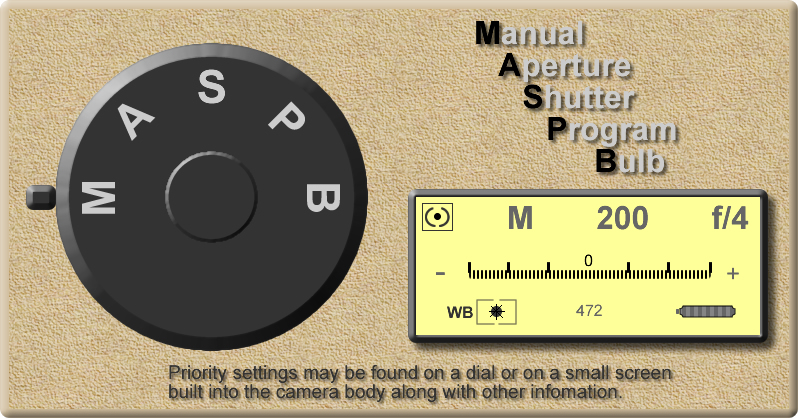
Priority Shooting Modes: This is where you select the specific setting you "must have" for your shots and the camera changes other setting to obtain what it thinks is the correct exposure. I've found that my various Canon cameras don't do a very good job of proper exposure. My Nikon does a better job but is still far from perfect. I almost always shoot manual mode as I just have better results than allowing the camera to decide what's correct.
- Aperture: You set the aperture and the camera changes shutter speed and/or ISO for correct exposure.
- Shutter: You set the shutter speed and the camera changes aperture and/or ISO for correct exposure.
- Program: Allows you to adjust both aperture and shutter speeds, usually with different dials, while the camera adjusts the other one for what it calculates is the proper exposure. It's almost an automatic mode except that you can make changes to aperture and shutter speed where auto mode does it all. The difference between program mode and manual mode is that manual doesn't adjust the other setting for proper exposure. You set everything and the camera lets you make your mistakes and hopefully learn from them.
- Manual: You set ISO, shutter speed and aperture. On better cameras you have default buttons or knobs you can roll or turn easily to independently change aperture and shutter speeds. ISO is more likely to require a button press and a dial turn to change its settings. Becoming familiar wtih these three settings, without having to pull back from the camera to see the dials or buttons, can give you just the edge you need to capture that quick shot when you suddenly see something unexpected in your viewfinder. Taking that extra couple seconds to pull back from the camera to look at what you need to change can cost you a once-in-a-lifetime shot. If you shoot often enough, you'll soon be surprised at how close you can get to just the right settings for that properly exposed shot without a lot of post-processing on your computer.
You may have noticed the B on the dial and in the graphic text. Bulb mode allows you to hold down the shutter button and make a longer exposure than you would be able to do in any of the priority modes except for manual. But, in manual mode, you set the shutter speed and it is locked in for that period of time when you take a picture. In Bulb mode, you simply hold down the shutter release until you feel you want to stop the exposure. Then stop pressing the shutter release and the photo is finalized. This works well for creating movement in your photos and for one of my specialties, which is firework pattern creation. Randomly hold the shutter release button for varying periods of time and move the camera in different directions while capturing fireworks. When I release the shutter button, my firework pattern is created. I just never quite know what I'm going to get in my final image. In 2014, I tried my first long-exposure fireworks photography using this bulb mode. Those examples can be viewed here: 2014 Fireworks Beginning in 2015, I started using more camera movement during each exposure which completely changed the outcome, I think for the better. 2015 Fireworks Additional years of firework images can be accessed from the main website page's left-hand menu.