Stabilization: Mechanical methods employed either in the lens or to the sensor in the camera to counteract camera movement typically induced by the photographer. In-lens stabilization uses a spining element the creates a stabilizing effect similar to a gyroscope. The noise you might hear from an in-lens stabilizer is usually a noticeable whiring sound that begins when you press your shutter release part way (usually to focus before shooting) and that noise stops when the stabilization ends, after releasing the shutter button, regardless of whether you actually take a picture. This stabilization allows hand-holding your camera and lens while using much slower shutter speeds than you might otherwise be able to use while still getting a photograph that is sharply focused.
Movement of the camera/lens during shooting causes blurring of the image if the shutter speed is too slow to "freeze" the camera movement. The general rule of thumb is shutter speed should be the reciprocal of at least twice the lens mm specification when shooting a still subject. A 400m lens would need a 1/800th of a second shutter speed for normal hand-held operation without the use of stabilization. Stabilization ratings are referenced as "stops." a 2-stop stabilization rating allows the lens to be shot at 1/4th the "rule of thumb speed." Instead of 1/800th of a second, the 400m lens could be shot at 1/200th of a second handheld. Modern stabilization claims of 4 and 5 stops are not uncommon but those lenses tend to be very expensive, especially at the 300mm and larger magnifications. The Canon 800mm, f/5.6 lens claims a 5-stop, in-lens stabilization capability. That would mean I should be able to hand-hold that lens and shoot at 1/50th of a second. I must admit, I have managed a few shots at that speed that were actually nicely sharp, but that is extremely rare. Typically any movement at that focal length and shutter speed would result in a very blurry image.
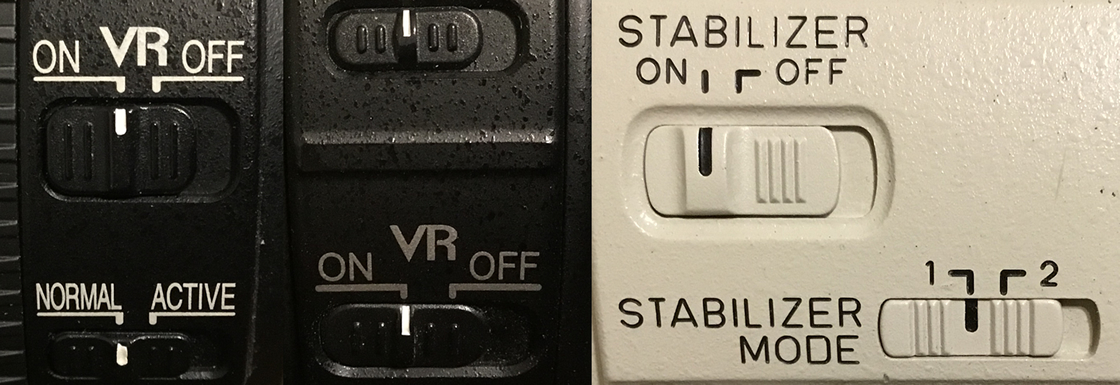
Stabilized lenses may have two multi-position switches somewhere on the side of the lens. One "button" will be for stabilization on or off. The second button, if present, would be used for setting the stabilization mode. One setting is for general still photography, where the subject isn't moving and neither is the photographer. The other setting would be a tracking mode where stabilization is provided along the perpendicular axis to which the lens is scanned to track a moving subject. For example, while tracking a deer running left to right, the lens stabilization works to minimize lens movement up and down. If tracking a subject moving up or down, the stabilization minimizes movement left and right. Trying to track a subject in any direction with the stabilization set to full stabilization (minimize movement in all directions), can be difficult to do smoothly. The lens tends to resist movement and then suddenly jumps in the direction you're trying to move it. Nikon's Normal stabilization mode is for generally still subjects while the Active setting is for moving subjects such as flying birds, walking or running people, or speed boats on a lake. The Canon equivalents are 1 (still) and 2 (tracking moving subjects.) The middle image, from the Nikon 105mm macro lens has only VR (vibration reduction) setting, with no second "mode" switch, because you can forget about tracking subjects in macro mode. If they are moving, your depth of field is so narrow, the subject will quickly be out of focus. It's not as much of an issue if you are shooting this lens as a standard lens but the size of the lens makes it fairly simple to track subjects despite the VR mode being turned on.
The best example I can provide is my own experience trying to track the International Space Station with full stabilization on. I find the station and start shooting. As I try to follow the station across the sky, I find I can't maintain smooth movement. No matter what I do, I simply can't keep the camera's center focus point on the station. I either get ahead of it of fall behind. It's actually amazing I ever get any "good" shots of it. Setting the stabilization switch/button to tracking mode makes the camera movement much smoother. Now if I could just make the auto-focus work...
In camera stabilization is very different and makes no discernable noise. In camera stabilization works by moving the sensor along multiple axes (plural of axis, not mulitple hatchet-like implements.) The sensor is moved left to counter camera movement to the right and vice versa. It can also be moved up and down to counter movement in the opposite direction. Some cameras claim movement along other axes such as forward and backward or even tilting. These are less common as the speed of the autofocus system typically accounts for slight changes in distance from the subject. Tilting would typically have its greatest effect when shooting at close range rather than at distance.